At work, we run Pinpoint in Docker on 1 EC2 instance. For a while, memory issues on the instance made Pinpoint unstable, but it has been running reliably since we upgraded the instance. At the time, I had no idea how to manage the Pinpoint containers. I want to take this opportunity to install it myself and get some experience.
I found the explanation of running Pinpoint in Docker on its official GitHub repository.
Pinpoint-Docker for Pinpoint
https://github.com/pinpoint-apm/pinpoint-docker
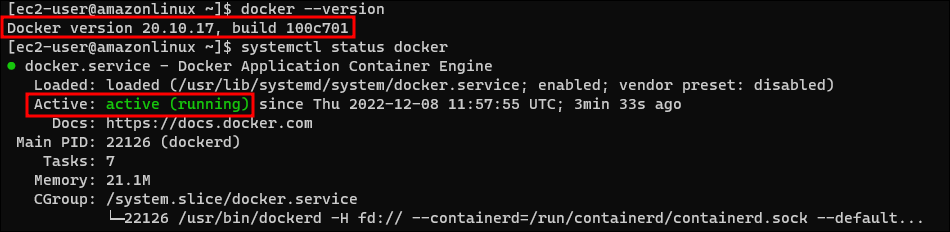
According to the Requirements, a Docker version higher than 18.02.0 is required. Let's install Docker first.
sudo yum -y update
sudo amazon-linux-extras install docker
sudo docker --version
sudo systemctl restart docker
sudo systemctl enable docker
sudo usermod -aG docker $USER
I confirmed that the installation meets the requirements. Now let's install Pinpoint.
yum -y install git
sudo git clone https://github.com/pinpoint-apm/pinpoint-docker.git
sudo curl -L https://github.com/docker/compose/releases/download/1.22.0/docker-compose-$(uname -s)-$(uname -m) -o /usr/local/bin/docker-compose
sudo chmod +x /usr/local/bin/docker-compose
sudo docker-composer version
cd pinpoint-docker/
docker-compose pull && docker-compose up -d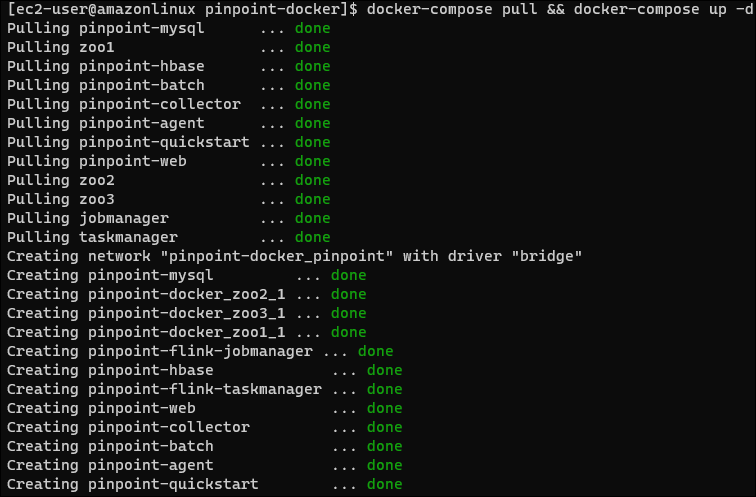
It seems we use a similarly minimal setup at work. Installation was much easier than I expected.
I tried to access the Pinpoint console, but it was unreachable, as though it had hung.
I had allocated 2GB of memory to the VM. After increasing it to 4GB, I confirmed that the Pinpoint console was accessible. I suspect the number of containers meant it needed more memory.
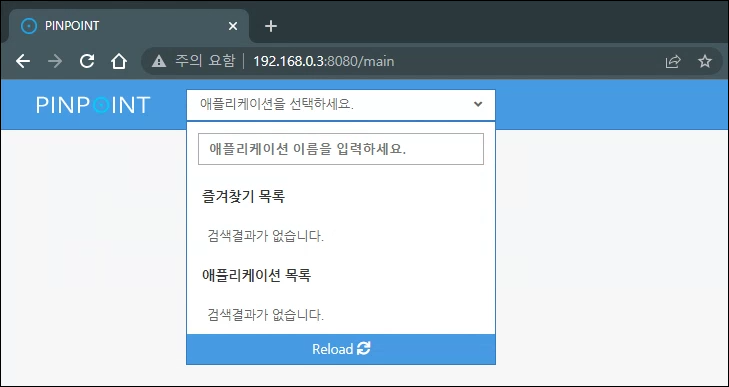
The list is empty because no servers currently have a Pinpoint agent attached. If I get the chance, I will attach one and check it. When I have time, I also want to look into whether there are resource settings I can tune for the internal containers.