I use Grafana and Argo CD, and felt that managing users separately was unnecessary.
As more people joined the company, managing each system separately every time seemed very inefficient.
We were already using Keycloak to control access to kube-apiserver,
so I wondered whether we could manage accounts for the add-ons in a similar way.
A Google search turned up a few examples. I decided to apply this to the resources I operate and document the process.
ArgoCD와 Grafana의 KeyCloak 로그인 연동
ArgoCD와 Grafana의 KeyCloak 로그인 연동
Read the diagram as text
- ArgoCD는 values.yaml configs.cm의 oidc.config(issuer, clientID, clientSecret)로 KeyCloak에 OIDC 로그인한다.
- KeyCloak에서 만든 그룹 이름을 policy.csv가 argocd-admin→role:admin, argocd-member→role:readonly로 매핑한다.
- logoutURL로 ArgoCD에서 로그아웃할 때 KeyCloak 세션도 끊어지도록 설정할 수 있다.
- Grafana는 values.yaml의 평문 client_secret이 막혀 env의 GF_AUTH_GENERIC_OAUTH_* 변수로 auth, token, api URL을 설정한다.
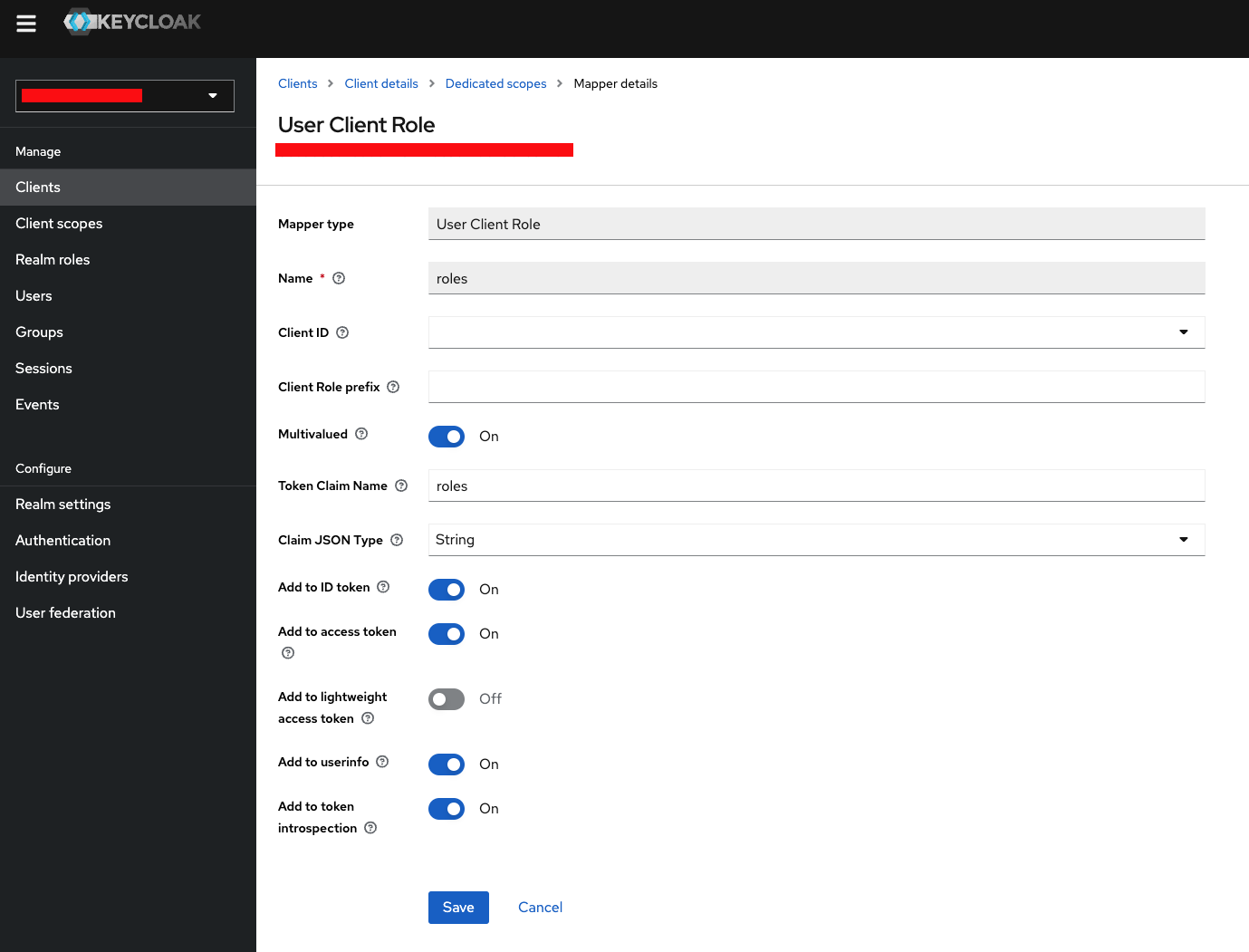
- Dedicated scopes에 추가한 roles를 role_attribute_path가 Admin, Editor, Viewer로 나눈다.
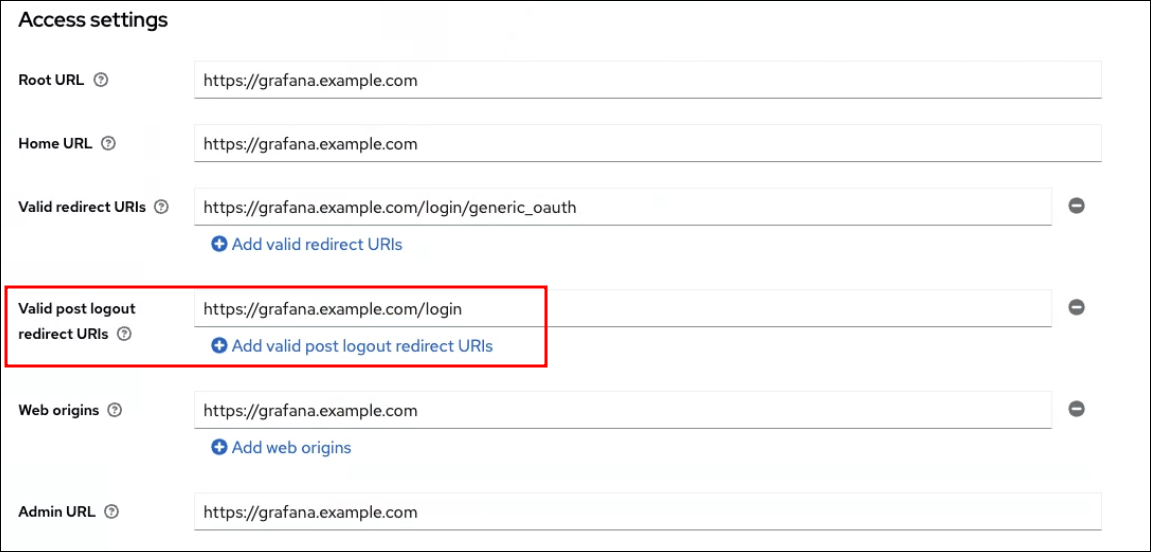
- GF_AUTH_SIGNOUT_REDIRECT_URL로 로그아웃한다. KeyCloak Client에 Valid post logout redirect URIs를 적용해야 세션이 끊어졌다.
Argo CD
1. Reinstall Keycloak
Before changing the Argo CD configuration, I reinstalled Keycloak.
The Argo CD OIDC configuration accepts a logoutURL attribute. It can be configured so that logging out of Argo CD also ends the Keycloak session.
The logoutURL must match the REST API specification for logging out of Keycloak. The version I was using, 17.0.1-legacy, was too old, which made it difficult to find an appropriate REST API URL.
~ helm search repo keycloak
NAME                    CHART VERSION   APP VERSION     DESCRIPTION
bitnami/keycloak        21.4.4          24.0.5          Keycloak is a high performance Java-based ident...
codecentric/keycloak    18.4.4          17.0.1-legacy   Open Source Identity and Access Management For ...
codecentric/keycloakx   2.3.0           22.0.4          Keycloak.X - Open Source Identity and Access Ma...
I had been using the keycloak Helm chart from codecentric, but this time I reinstalled version 24.0.5 using the bitnami keycloak chart.
2. Configure OIDC for Argo CD
The official documentation covers most of the configuration. Because I deployed Argo CD with a Helm chart, I changed the attributes in values.yaml and redeployed, rather than editing the ConfigMap and Secret directly as in Configuring Argo CD OIDC.
...
...
configs:
  cm:
    url: https://argocd.example.com
    oidc.config: |
      name: Keycloak
      issuer: https://keycloak.exmaple.com/realms/exmaple
      clientID: example
      clientSecret: $oidc.keycloak.clientSecret
      requestedScopes: ["openid", "profile", "email", "groups"]
      logoutURL: https://keycloak.example.com/realms/example/protocol/openid-connect/logout?id_token_hint={{token}}&post_logout_redirect_uri=https://argocd.example.com
...
...
  secret:
    extra:
      oidc.keycloak.clientSecret: ********************************
...
...
  rbac:
    policy.csv: |
      g, argocd-admin, role:admin
      g, argocd-member, role:readonly
...
...- Replace the example placeholders with the domain, realm, and client appropriate for your environment.
- In configs.secret.extra.oidc.keycloak.clientSecret, replace
********************************with a client secret generated in the Client's Credentials tab in the Keycloak console. - For configs.rbac.policy.csv, create groups in Keycloak according to your Argo CD operational policy and grant permissions to each group. In my case, I created an argocd-admin group with Argo CD admin permissions and an argocd-member group with readonly permissions in Keycloak.
- If you do not configure logoutURL, the Keycloak session remains active after logging out of Argo CD, so you can log in again. This may depend on how you configure the session lifetime in Keycloak.
Grafana
The official Grafana Labs documentation provides a helpful guide. Following it covers most of the configuration, but I have documented a few points that needed extra attention.
auth.generic_oauth
I modified values.yaml according to the guide and deployed it, but encountered an error.
Sensitive key 'auth.generic_oauth.client_secret' should not be defined explicitly in values. Use variable expansion instead. You can disable this client-side validation by changing the value of assertNoLeakedSecrets.Looking at the grafana chart helper, I found the following comment.
It prevented data from being entered in plaintext in values.yaml.
...
...
{{/*
    Checks whether the user is attempting to store secrets in plaintext
    in the grafana.ini configmap
*/}}
{{/* grafana.assertNoLeakedSecrets checks for sensitive keys in values */}}
...
...
A Google search showed that environment variables could be used, so I modified values.yaml and deployed it.
# kube-prometheus-stack/values.yaml
...
...
# 오류 발생
grafana:
  grafana.ini:
    auth.generic_oauth:
      enabled: true
      name: Keycloak
      allow_sign_up: true
      client_id: grafana-client
      client_secret: ********************************
      scopes: openid email profile offline_access roles
      email_attribute_path: email
      login_attribute_path: username
      name_attribute_path: full_name
      auth_url: https://keycloak.example.com/realms/example/protocol/openid-connect/auth
      token_url: https://keycloak.exmaple.com/realms/example/protocol/openid-connect/token
      api_url: https://keycloak.example.com/realms/example/protocol/openid-connect/userinfo
      role_attribute_path: contains(roles[*], 'admin') && 'Admin' || contains(roles[*], 'editor') && 'Editor' || 'Viewer'
      signout_redirect_url: https://keycloak.example.com/realms/example/protocol/openid-connect/logout?post_logout_redirect_uri=https%3A%2F%2Fhttps://grafana.example.com%2Flogin
...
...

# 개선
...
...
grafana:
  env:
    GF_SERVER_DOMAIN: "https://grafana.example.com"
    GF_SERVER_ROOT_URL: "https://grafana.example.com"
    GF_AUTH_GENERIC_OAUTH_ENABLED: "true"
    GF_AUTH_GENERIC_OAUTH_NAME: "Keycloak"
    GF_AUTH_GENERIC_OAUTH_ALLOW_SIGN_UP: "true"
    GF_AUTH_GENERIC_OAUTH_CLIENT_ID: "grafana-client"
    GF_AUTH_GENERIC_OAUTH_CLIENT_SECRET: "********************************"
    GF_AUTH_GENERIC_OAUTH_SCOPES: "openid email profile offline_access roles"
    GF_AUTH_GENERIC_OAUTH_AUTH_URL: "https://keycloak.example.com/realms/example/protocol/openid-connect/auth"
    GF_AUTH_GENERIC_OAUTH_TOKEN_URL: "https://keycloak.example.com/realms/example/protocol/openid-connect/token"
    GF_AUTH_GENERIC_OAUTH_API_URL: "https://keycloak.example.com/realms/example/protocol/openid-connect/userinfo"
    GF_AUTH_GENERIC_OAUTH_ROLE_ATTRIBUTE_PATH: "contains(roles[*], 'admin') && 'Admin' || contains(roles[*], 'editor') && 'Editor' || 'Viewer'"
    GF_AUTH_SIGNOUT_REDIRECT_URL: 'https://keycloak.example.com/realms/example/protocol/openid-connect/logout?post_logout_redirect_uri=https://grafana.example.com/login&client_id=grafana-client'
...
...
signout_redirect_url
As with Argo CD, I wanted logging out to end the Keycloak session as well.
I set GF_AUTH_SIGNOUT_REDIRECT_URL in the Grafana variables, but the Keycloak session still remained active.
Setting Valid post logout redirect URIs in the Client configuration for Grafana resolved this.
Client scopes
Following only the official documentation resulted in every user receiving Viewer permissions.
After trying several approaches, I resolved this by adding a new object called 'roles' under Dedicated scopes and enabling all its options. Users then received the appropriate permissions.
References
https://honglab.tistory.com/265#fromHistory
https://kmaster.tistory.com/77
https://ksr930.tistory.com/277
https://enginnersnack.tistory.com/16